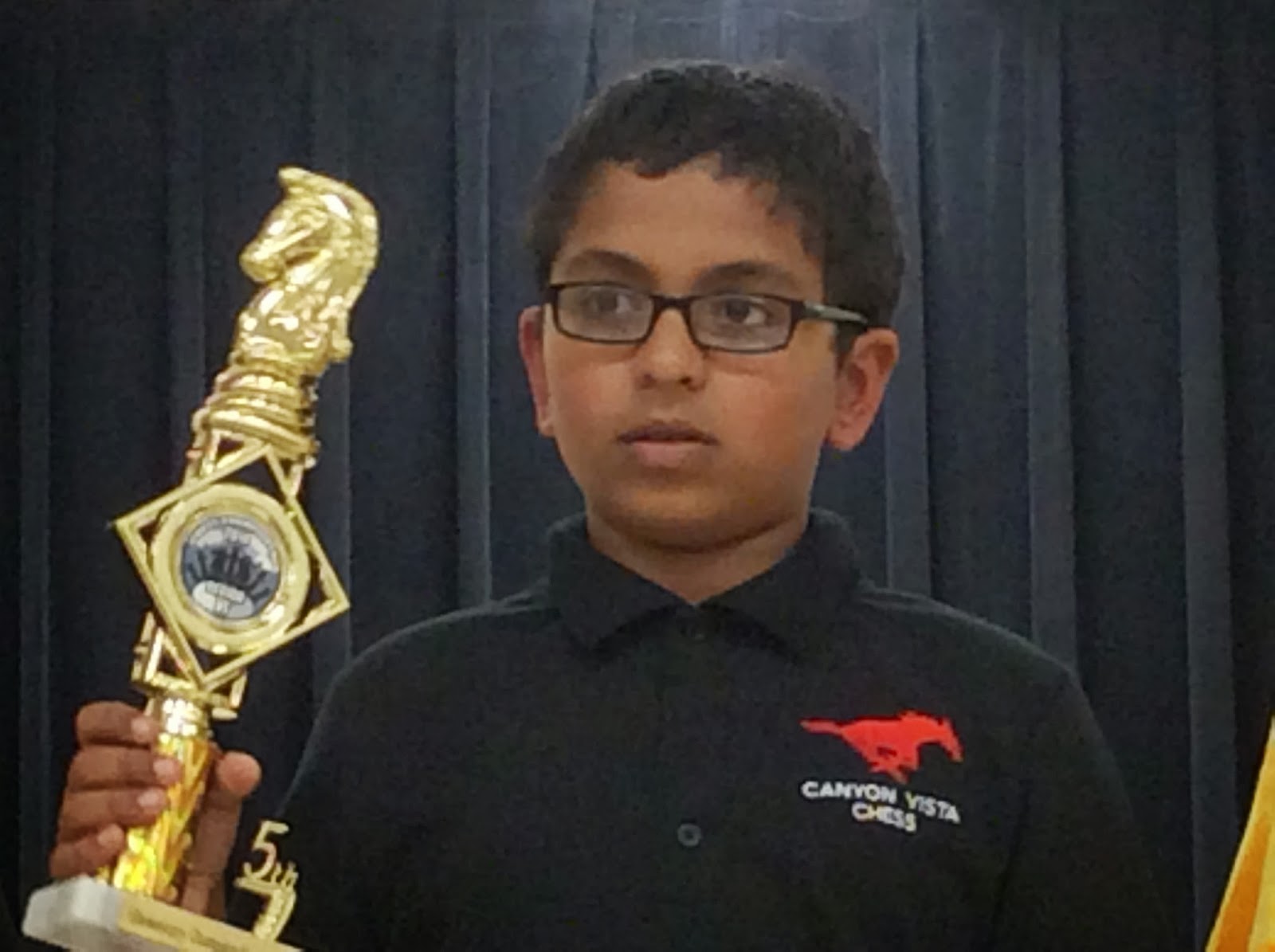
Both Dhanvi & Saketh participated and won trophies.
For Saketh this is his first tournament & it is positive one.
I will add more details about this event in blog post.
For now few pictures.
Daily I help teams with solution engineering aspect of connected vehicle data projects. (massive datasets & always some new datasets with new car models aka new technologies.) Lately in the spare time, applying some of the ML/Deep learning techniques on datasets (many are create based on observations of real datasets)To Share some thoughts on my work (main half of this blog) and the other half will be about my family and friends.
Sunday, March 30, 2014
Wednesday, March 05, 2014
SOLR Velocity Template based web UI to database dictionary aka database walker
Here primary use
case is, in most of the large IT organizations, lot’s of internal IT applications
uses some kind of RDBMS as back-end and over the years, one will see hundred of
databases. Again typical SOLO style operations
i.e. one department focus on their needs only. In general one will end up
seeing lot’s of duplication of data. However In my case, I end up analyzing
very large database (hundred of schema or tables spaces and thousands of tables
and 5 digit number of columns.) views, materialized views, stored procedures
and many more. I noticed lot’s of people
are using Oracle SQL developer for analysis and keep jumping from one table or
view to other tables in other schemas. After seeing this, I wrote a small database
walker. Primary purpose is to crawls entire
Oracle data dictionary and produces some xml. I am feeding this to SOLR so that
I can build simple Google kind of interface with using SOLRs default velocity templates
based web UI to search for tables or columns or schemas or primary key and many
more. I will host entire project in the GIT hub. In this post, I am including
Oracle Table metadata only. (i.e. table columns, primary key, import & exported
keys and column meta data etc. I wrote more code to pull stored procedures code
etc.)
public static void tableInfo(DatabaseMetaData meta,String tableName,String tableType, String schemaName) throws Exception {
String catalog = null;
String schemaPattern = schemaName;
String tableNamePattern = tableName;
String columnNamePattern = null;
String outputFile = stageDir+schemaName+"_"+tableName+".xml";
File f = new File(outputFile);
if (f.exists()){
System.out.print("Skiping->"+outputFile);
return;
}
FileWriter fw = null;
try{
fw = new FileWriter(outputFile);
}catch(Exception e){
System.out.print("Error ... Skiping->"+outputFile);
return;
}
if (fw == null){
System.out.print("Unable to open file. Skiping->"+outputFile);
return;
}
fw.write("<add>\n");
fw.write("<doc>\n");
ResultSet result = meta.getColumns(
catalog, schemaPattern, tableNamePattern, columnNamePattern);
String colName = "field name=\""+"id"+"\"";
fw.write("<" + colName + ">");
fw.write(tableName);
fw.write("</field>");
fw.write( "\n");
colName = "field name=\""+"tableName"+"\"";
fw.write("<" + colName + ">");
fw.write(tableName);
fw.write("</field>");
fw.write( "\n");
colName = "field name=\""+"tableType"+"\"";
fw.write("<" + colName + ">");
fw.write(tableType);
fw.write("</field>");
fw.write( "\n");
colName = "field name=\""+"schemaName"+"\"";
fw.write("<" + colName + ">");
fw.write(schemaName);
fw.write("</field>");
fw.write( "\n");
while(result.next()){///TODO remove 2,3,3 junk
String columnName = result.getString(4);
int columnType = result.getInt(5);
String columnTypeStr = result.getString(6);
String catName = result.getString(1);
colName = "field name=\""+"colName"+"\"";
fw.write("<" + colName + ">");
fw.write(columnName);
fw.write("</field>");
fw.write( "\n");
//colName = "field name=\""+columnName+"_dtype"+"\"";
// fw.write("<" + colName + ">");
//fw.write(columnTypeStr);
// fw.write("</field>");
//fw.write( "\n");
colName = "field name=\""+"colMeta"+"\"";
fw.write("<" + colName + ">");
fw.write(columnName+","+columnTypeStr);
fw.write("</field>");
fw.write( "\n");
////pull logical data.
String[] logicalData = LogicalMetadata.getLogicalData(schemaName, tableName,columnName);
if ( logicalData != null && logicalData.length <=7){
String entityName = logicalData[3];
String entityAttrName = logicalData[4];
String entityAttrDesc = logicalData[6];
/*
colName = "field name=\""+"logicalEntityName"+"\"";
fw.write("<" + colName + ">");
fw.write(entityName);
fw.write("</field>");
fw.write( "\n");*/
String logicalName = columnName+ "_lan";
colName = "field name=\""+logicalName+"\"";
fw.write("<" + colName + ">");
fw.write(entityAttrName);
fw.write("</field>");
fw.write( "\n");
String logicalDesc = columnName+ "_lad";
colName = "field name=\""+logicalDesc+"\"";
fw.write("<" + colName + ">");
fw.write(entityAttrDesc);
fw.write("</field>");
fw.write( "\n");
}
}
result.close();
ResultSet result1 = meta.getPrimaryKeys(
catalog, schemaName, tableNamePattern);
String columnName = null;
HashSet set = new HashSet();
while(result1.next()){
columnName = result1.getString(4);
if (set.contains(columnName)){
//do nothing
}else{
colName = "field name=\""+"primaryKey"+"\"";
fw.write("<" + colName + ">");
fw.write(columnName);
fw.write("</field>");
fw.write( "\n");
set.add(columnName);
//System.out.println(" primary key" + columnName);
}
}
result1.close();
/////
set.clear();
ResultSet rs = meta.getExportedKeys(
catalog, schemaPattern, tableNamePattern );
while (rs.next()) {
String fkTableName = rs.getString("FKTABLE_NAME");
String fkColumnName = rs.getString("FKCOLUMN_NAME");
int fkSequence = rs.getInt("KEY_SEQ");
colName = "field name=\""+"ExportedKeys_Table_Colum_Seq"+"\"";
fw.write("<" + colName + ">");
fw.write(fkTableName+"."+fkColumnName+"."+fkSequence);
fw.write("</field>");
fw.write( "\n");
}
rs.close();
ResultSet foreignKeys = meta.getImportedKeys( catalog, schemaName, tableNamePattern);
while (foreignKeys.next()) {
String fkTableName = foreignKeys.getString("FKTABLE_NAME");
String fkColumnName = foreignKeys.getString("FKCOLUMN_NAME");
String pkTableName = foreignKeys.getString("PKTABLE_NAME");
String pkColumnName = foreignKeys.getString("PKCOLUMN_NAME");
colName = "field name=\""+"ImportedKeys_Table_Colum_Seq"+"\"";
fw.write("<" + colName + ">");
fw.write(fkTableName+"."+fkColumnName+"."+pkTableName+"."+pkColumnName);
fw.write("</field>");
fw.write( "\n");
}
foreignKeys.close();
fw.write("</doc>\n");
fw.write("</add>\n");
fw.flush();
fw.close();
}
Monday, March 03, 2014
Very Old: XSLT, XSL code convert XML file to produce SOLR documents ( aka xml)
Based on content needs, I used different strategies to produce SOLR input documents.
One of old post, contains Excel input to SOLR input documents.
In this particular use-case, a simple XSL aka XSLT, style-sheet converts an incoming eCommerce XML content feed in to SOLR documents & pushes these documents to SOLR staging folder.
From there, our custom SOLR component consumes these xml to add or update new content at regular intervals. I will post that custom SOLR component logic later in this blog. For now, I am including sample stylesheet which produces solr input XML document based another XML input feed
<xsl:stylesheet
xmlns:xsl="http://www.w3.org/1999/XSL/Transform" version="1.0">
<xsl:strip-space elements="*"/>
<xsl:output method="xml" />
<xsl:template match="/products">
<add>
<xsl:apply-templates />
</add>
</xsl:template>
<xsl:template match="product">
<doc>
<xsl:element name="field">
<xsl:attribute name="name">id</xsl:attribute>
<xsl:value-of select="./@skuNo"/>
</xsl:element>
<xsl:element name="field">
<xsl:attribute name="name">status</xsl:attribute>
<xsl:value-of select="./@status"/>
</xsl:element>
<xsl:element name="field">
<xsl:attribute name="name">brand</xsl:attribute>
<xsl:value-of select="./brand"/>
</xsl:element>
<xsl:element name="field">
<xsl:attribute name="name">description</xsl:attribute>
<xsl:value-of select="./descriptions/description"/>
</xsl:element>
<xsl:element name="field">
<xsl:attribute name="name">department</xsl:attribute>
<xsl:value-of select="./department/@name"/>
</xsl:element>
<!-- one can debate laterĂ¢€¦ this is for now -->:q!
<xsl:element name="field">
<xsl:attribute name="name">categoryname</xsl:attribute>
<xsl:value-of select="./class/@name"/>
</xsl:element>
<xsl:call-template name="addCurrentPrice">
<xsl:with-param name="price" select="."/>
</xsl:call-template>
<xsl:call-template name="addTaxonomyContent">
<xsl:with-param name="skid" select="."/>
</xsl:call-template>
</doc>
</xsl:template>
<xsl:template name="addCurrentPrice">
<xsl:param name="product"/>
<xsl:for-each select="./offers/offer/prices/*">
<xsl:element name="field">
<xsl:attribute name="name"><xsl:value-of select="@type"/></xsl:attribute>
<xsl:value-of select="@amount"/>
</xsl:element>
</xsl:for-each>
</xsl:template>
<xsl:template name="addTaxonomyContent">
<xsl:param name="product"/>
<xsl:for-each select="./hierarchy/*">
<xsl:variable name="ctr" select="position()"/>
<xsl:variable name="variable" select="concat('tname_',$ctr)"/>
<xsl:element name="field">
<xsl:attribute name="name"><xsl:value-of select="$variable"/></xsl:attribute>
<xsl:value-of select="@name"/>
</xsl:element>
</xsl:for-each>
</xsl:template>
</xsl:stylesheet>
Sunday, March 02, 2014
Sloppy Kohl's sale sign
After moving to Austin, TX, this is 2ed time, I visited nearby Kohl’s location (zip code 78759)
During first visit, during December last week, I noticed store was very sloppy. I thought it is because of peak sales season. ( I was comparing
w.r.t. Kohl’s Minneapolis stores.)
Yesterday, I went buy shoes for my Saketh. Still store is sloppy. few customers.
See the following picture. (Sale price is greater registered price.)
I keep getting too many e-mails/ physical mails
mentioning about sales however, at store level their execution is very poor. May be it is time, Kohl’s management needs to
slow down on sales promotion & focus on basic things.
Wednesday, February 26, 2014
Personal stock portal… YQL experiments.
In general, Lots of portals provides stock quote information.
For example, @finance.yahoo.com, one can give a valid stock ticker & gets the
stock information. From this point, if you want to know more about company
profile you have to click one link or one more web service call. If you want to know more about last year
statistics, you have to click or one more web service call. Couple of years back, after knowing
little bit of YQL, I did small POC. Basically given a stock ticker, system will display complete
snapshot of the company in one click. It is a fun ride however with all bug in YQL, It remained
as POC only.
Tons of code. But I will dump few important methods.
////
String stockSym = "AAPL";
SupplierSection StockInfo = new SupplierSection(stockSym);
StockInfo.createHttpClient();
StockInfo.crawlFinanceInfo(stockSym);//crawlRssInfo
StockInfo.crawlProfileInfo(stockSym);
StockInfo.crawlKeyStats(stockSym);
StockInfo.crawlRssInfo(stockSym);
StockInfo.crawlQuantInfo(stockSym);//crawlRssInfo
//StockInfo.printAllPublicInfo();
try {
//StockInfo.writeToXmlFile();
//StockInfo.writeToXmlFile1(stockSym);
StockInfo.writehtmlFile1(stockSym);
} catch (Exception e) {
// TODO Auto-generated catch block
e.printStackTrace();
}
///basic compnay info
public void crawlProfileInfo(String stockSym) {
CloseableHttpClient httpclient = HttpClients.createDefault();
try {
GetMethod httpGet = new GetMethod("http://query.yahooapis.com/v1/public/yql?q=select%20*%20from%20yahoo.finance.stocks%20where%20symbol%3D%22"+stockSym+"%22&env=store%3A%2F%2Fdatatables.org%2Falltableswithkeys");
httpGet.setFollowRedirects( true );
System.out.println("executing request in crawlProfileInfo " );
int responseCode = httpClient.executeMethod(httpGet);
byte[] data = httpGet.getResponseBody();
if (responseCode >= 400) {
System.out.println("Failed to send request "+ responseCode);
}else{
String xmlString = new String( data, ENCODING );
//System.out.println("xml string "+ xmlString);
DocumentBuilderFactory factory = DocumentBuilderFactory.newInstance();
DocumentBuilder db = factory.newDocumentBuilder();
InputSource inStream = new InputSource();
inStream.setCharacterStream(new StringReader(xmlString));
Document doc = db.parse(inStream);
String fName = "CompanyName";
profileInfo.put(fName,getFieldValue(doc,fName));
fName = "Sector";
profileInfo.put(fName,getFieldValue(doc,fName));
fName = "Industry";
profileInfo.put(fName,getFieldValue(doc,fName));
fName = "FullTimeEmployees";
profileInfo.put(fName,getFieldValue(doc,fName));
fName = "start";
profileInfo.put(fName,getFieldValue(doc,fName));
fName = "end";
profileInfo.put(fName,getFieldValue(doc,fName));
}
public void crawlKeyStats(String stockSym) {
try {
GetMethod httpGet = new GetMethod("http://query.yahooapis.com/v1/public/yql?q=SELECT%20*%20FROM%20yahoo.finance.keystats%20WHERE%20symbol%3D'"+stockSym+"'&diagnostics=false&env=store%3A%2F%2Fdatatables.org%2Falltableswithkeys");
httpGet.setFollowRedirects( true );
System.out.println("executing request in crawlKeyStats" );
int responseCode = httpClient.executeMethod(httpGet);
byte[] data = httpGet.getResponseBody();
if (responseCode >= 400) {
System.out.println("Failed to send request "+ responseCode);
}else{
String xmlString = new String( data, ENCODING );
System.out.println("xml string "+ xmlString);
DocumentBuilderFactory factory = DocumentBuilderFactory.newInstance();
DocumentBuilder db = factory.newDocumentBuilder();
InputSource inStream = new InputSource();
inStream.setCharacterStream(new StringReader(xmlString));
Document doc = db.parse(inStream);
processKeyStatsResponse(doc);
}
} catch (Exception e) {
e.printStackTrace();
} finally {
}
}
public void crawlRssInfo(String stockSym) {
try {
GetMethod httpGet = new GetMethod("http://query.yahooapis.com/v1/public/yql?q=select%20*%20from%20html%20where%20url%3D'http%3A%2F%2Ffinance.yahoo.com%2Fq%3Fs%3D"+stockSym+"'%20and%20xpath%3D'%2F%2Fdiv%5B%40id%3D%22yfi_headlines%22%5D%2Fdiv%5B2%5D%2Ful%2Fli%2Fa'&diagnostics=true");
httpGet.setFollowRedirects( true );
System.out.println("executing request in crawlRssInfo" );
int responseCode = httpClient.executeMethod(httpGet);
byte[] data = httpGet.getResponseBody();
if (responseCode >= 400) {
System.out.println("Failed to send request "+ responseCode);
}else{
String xmlString = new String( data, ENCODING );
//System.out.println("xml string "+ xmlString);
DocumentBuilderFactory factory = DocumentBuilderFactory.newInstance();
DocumentBuilder db = factory.newDocumentBuilder();
InputSource inStream = new InputSource();
inStream.setCharacterStream(new StringReader(xmlString));
Document doc = db.parse(inStream);
processRssResponse(doc);
}
} catch (Exception e) {
e.printStackTrace();
} finally {
}
}
Tuesday, February 25, 2014
Very Old: Java code convert Excel (CSV) file to generate SOLR documents
Scenario is :
Daily mainframe system generates delta of product
data (excel contains rows up to one million rows. Search needs to happen across
30+ product fields.) My initial thoughts are use XSLT however after seeing some
computation on some columns, I end up writing some Java code. This code
generate one SOLR document xml for each Excel row & with using post.jar
file, we used to index the data in one go. (Back in SOLR 1.4 days, JSON format
was not that popular & so I used xml. I have XSLT version too. Will post
that code very soon.)
import javax.xml.parsers.DocumentBuilder;
import javax.xml.parsers.DocumentBuilderFactory;
import javax.xml.transform.OutputKeys;
import javax.xml.transform.Transformer;
import javax.xml.transform.TransformerFactory;
import javax.xml.transform.dom.DOMSource;
import javax.xml.transform.stream.StreamResult;
import org.w3c.dom.Attr;
import org.w3c.dom.Document;
import org.w3c.dom.Element;
public class CsvToSolrXmlDoc
{
public String[] columnNames = null;
public String getColumnName(int i)
{
if ( i>columnNames.length -1 ) return "checkInputData";
return columnNames[i];
}
public void initHeaders(String[] cols)
{
columnNames = cols;
}
public void writeProdInfo(String[] cols) throws Exception {
if ( cols.length == 0) return;
String prodId= cols[0];
try {
int idVal = Integer.parseInt(prodId); /// this is my use case. U can ignore this validation
} catch (NumberFormatException e) {
System.out.println("\n Skiping id "+prodId);
return;
}
String outputFile = "c:\\a_edocs" + "\\"+prodId+".xml"
try {
DocumentBuilder builder = DocumentBuilderFactory.newInstance().newDocumentBuilder();
Document doc = builder.newDocument();
Element addEle = doc.createElement("add");
doc.appendChild(addEle);
Element root = doc.createElement("doc");
addEle.appendChild(root);
String fname = "field";
for ( int i=0; i
String cName = getColumnName(i);
////DO ALL column based post processing
String value = cols[i].trim();
if ( value == null) value = "";
Element node = doc.createElement(fname);
Attr attr = doc.createAttribute("name");
attr.setValue(cName);
node.setAttributeNode(attr);
node.appendChild(doc.createTextNode(value));
root.appendChild(node);
}
DOMSource domSource = new DOMSource(doc);
Transformer transformer = TransformerFactory.newInstance().newTransformer();
transformer.setOutputProperty(OutputKeys.INDENT, "yes");
transformer.setOutputProperty(OutputKeys.ENCODING, "UTF-8");
StreamResult result = new StreamResult(new File(outputFile));
transformer.transform(domSource, result);
} catch (Exception e) {
e.printStackTrace();
}
}
public void csvToXML(String inputFile) throws java.io.FileNotFoundException, java.io.IOException
{
BufferedReader br = new BufferedReader(new FileReader(inputFile));
StreamTokenizer st = new StreamTokenizer(br);
String line = null;
int i=0;
while ((line = br.readLine()) != null){
String[] values = line.split(",");
if ( i==0){
for ( int j=0; j
System.out.println("\n col index,name:"+j+":"+values[j]);
}
initHeaders(values);i++;
}else{
try {
writeProdInfo(values);
} catch (Exception e) {
// TODO Auto-generated catch block
e.printStackTrace();
}
}
}
br.close();
}
public static void main(String argv[]) throws java.io.IOException
{
CsvToSolrXmlDoc cp = new CsvToSolrXmlDoc();
cp.csvToXML("C:\\a_work\\three.csv");
}
}
Monday, February 24, 2014
Hierarchal suppler representation & traversal in RDBMS
For example consider organizations like PG, Siemens and GE
where the business is organized in multiple verticals and many subsidiaries
across the globe. One way of identifying all these units are DUNS numbers. Brief definition
of DUNS number is
At least in one standard (Dun & Bradstreet (D&B)
provides a D-U-N-S Number,
A unique nine digit identification number, for each physical
location of your business.)
Many global manufacturing companies uses this DUNS numbers
to organize their suppliers & their subsidiaries. In the sequence of post I
will explain relational way of mapping this suppler data to RDBMS and then to
Graph database (In this prototype, I am using neo4j as a graph data base.)
In the relational mapping, each suppler entity contains
following minimal set of attributes
Supplier primary_duns_number, supplier_name, address and
parent duns number.
(In case of root suppler organization, primary_duns_number
and parent duns’ number is same)
Following is the ORACLE specific SQL query, uses concepts
like CONNECT AND CYCLE etc.,
Which brings all parent rows for given child suppler primary
key.
>>
SELECT LEVEL,LPAD (' ', 2 * (LEVEL - 1)) || t1.PRIMARY_DUNS_NUMBER,
t1.SUPPLIER_NAME,
t1.PARENT_DUNS_NUMBER,
t1.address,
SYS_CONNECT_BY_PATH(t1.PRIMARY_DUNS_NUMBER, '/') "Path",
t2.SUPPLIER_NAME AS parent_name,
t2.PARENT_DUNS_NUMBER AS parent_id
FROM GQTS.SUPPLIER t1
LEFT JOIN GQTS.SUPPLIER t2 ON t2.PRIMARY_DUNS_NUMBER = t1.PARENT_DUNS_NUMBER
START WITH t1.PRIMARY_DUNS_NUMBER = 'DUNS_CODE'
CONNECT BY NOCYCLE PRIOR t1.PRIMARY_DUNS_NUMBER = t1.PARENT_DUNS_NUMBER
>>
Sunday, February 23, 2014
Dhanvi with San Antonio chess Trophy
Much needed confidence.
He was playing good however in last few tournaments, he fell short.
But this one, he made a decision, just one a day ahead, & joined with his friends.
He was playing good however in last few tournaments, he fell short.
But this one, he made a decision, just one a day ahead, & joined with his friends.
Saturday, February 22, 2014
Deploying Solr 4.61 in to weblogic
Assumptions:
Weblogic 10.X is
installed & running fine.
download SOLR 4.61 from http://lucene.apache.org/solr/
& expand the zip file.
a) Deploy the war file via console or auto-deploy folder.
You will notice exceptions in weblogic console saying that log jars missing exceptions
b) Now copy log jar files from \solr-4.6.1\example\lib\ext
to your weblogic domain's lib
On my local machine, this value is : domains\base_domain\lib
c) After copy & restart weblogic & start accessing
solr app.
Now system will
display tons of exceptions
(see the SOLR
JIRA SOLR-4762 for the issue & resolution.)
What I did is I expanded solr.war file (jar -xvf ...) & updated weblogic.xml file.
Following is my
weblogic file
<weblogic-web-app
xmlns="http://www.bea.com/ns/weblogic/90"
xmlns:xsi="http://www.w3.org/2001/XMLSchema-instance"
xsi:schemaLocation="http://www.bea.com/ns/weblogic/90 http://www.bea.com/ns/weblogic/90/weblogic-web-app.xsd">
<container-descriptor>
<filter-dispatched-requests-enabled>false</filter-dispatched-requests-enabled> <prefer-web-inf-classes>true</prefer-web-inf-classes>
</container-descriptor>
</weblogic-web-app>
D)Note: If you are
starting weblogic with explicit Solr.solr.home parameter, you are good
for example my
value is
-Dsolr.solr.home=C:\Oracle\Middleware\user_projects\domains\base_domain\solr
However, if you
are trying to set this value via solr\WEB-INF\web.xml changes
then you will
face one more issue or it will start at all.
Original web.xml contains
<!-- People who want to hardcode their "Solr Home" directly into the
WAR File can set the JNDI property here...
-->
<env-entry>
<env-entry-name>solr/home</env-entry-name>
<env-entry-value>C:\aa_valve_solr\solr</env-entry-value>
<env-entry-type>java.lang.String</env-entry-type>
</env-entry>
<!-- People who want to hardcode their "Solr Home" directly into the
WAR File can set the JNDI property here...
-->
<env-entry>
<env-entry-name>solr/home</env-entry-name>
<env-entry-value>C:\aa_valve_solr\solr</env-entry-value>
<env-entry-type>java.lang.String</env-entry-type>
</env-entry>
Above will not work. Weblogic keep saying Not valid xml file
WAR File can set the JNDI property here...
-->
<env-entry>
<env-entry-name>solr/home</env-entry-name>
<env-entry-type>java.lang.String</env-entry-type>
<env-entry-value>C:\aa_valve_solr\solr</env-entry-value>
</env-entry>
With this change (yes. Ordering of elements make the difference ) & SOLR will start successfully.
From this point, everything runs fine (i.e. indexing/search & i tried data import handlers etc.)
2014 Texas Data day conference
Recently I went to Texas Data day conference & there are
many talks around real time processing of data pipes. In particular lot's of talks/frameworks around log file processing,
HDFS for storing information,
Lucene based Search engines
for finding information
& open source graphics to render UI.
Everything
is open source & massively scalable frameworks.
In particular twitters engineers summingbird talk is crazy & interesting.
Following is above talks speaker deck.
This is placeholder. I will add more content later.
Example business rules code in Java
I used to do lots
of business rules implementation via Drools
A sample Java example is shown below.
This rule allow Claim submission up to 2ed Tuesday of the month.
Tons of util methods like to validate date ranges,
returning month integer as String,
finding second Tuesday of a month, First day etc.
I will add Drools integration code separately.
///In case of null input date, logic uses today's date.
static public boolean isValidClaimDate(Date inputDate ) {
Date checkDate = null;
if ( inputDate == null){
Calendar c = Calendar.getInstance();
checkDate = c.getTime();
}else{
checkDate = inputDate;
}
Date firstDay = getFirstDay();
Date secondTuesday = getSecondTuesday();
if (firstDay.before(checkDate) && secondTuesday.after(checkDate)) {
LOGGER.info("Validing current date"+ checkDate + " as true");
return true;
}else{
LOGGER.info("Validing current date"+ checkDate + " as false");
return false;
}
}
///works fine
static public Date getSecondTuesday() {
Calendar c = Calendar.getInstance();
int month = c.get ( Calendar.MONTH );
int year = c.get ( Calendar.YEAR );
Calendar cal = Calendar.getInstance(TimeZone.getTimeZone(Constants.estTimeZone));
cal.set( year, month , 1,18,0);
while (cal.get(Calendar.DAY_OF_WEEK) != Calendar.TUESDAY) {
cal.add(Calendar.DAY_OF_MONTH, 1);
}
//now add 7 more days to get 2ed week
cal.add(Calendar.DAY_OF_MONTH, 7);
return cal.getTime();
}
///check
static public Date getFirstDay() {
Calendar c = Calendar.getInstance();
int month = c.get ( Calendar.MONTH );
int year = c.get ( Calendar.YEAR );
Calendar cal = Calendar.getInstance(TimeZone.getTimeZone(Constants.estTimeZone));
cal.set( year, month ,1);
cal.set(Calendar.HOUR_OF_DAY, 0);
cal.set(Calendar.HOUR, 0);
cal.set(Calendar.MINUTE, 0);
cal.set(Calendar.SECOND, 0);
return cal.getTime();
}
static public boolean validUploadDateRange( int month, int year ) {
Calendar c = Calendar.getInstance(TimeZone.getTimeZone(Constants.estTimeZone));
int currentMonth = c.get ( Calendar.MONTH ); //note: this scale starts from "0"
int currentYear = c.get ( Calendar.YEAR );
if ( month == currentMonth && currentYear==year){
return true;
}
return false;
}
static public boolean validClaimsTimeRange( String monthStr, String yearStr ) {
if (monthStr == null || monthStr.equals("")){
return false;
}
if (yearStr == null || yearStr.equals("")){
return false;
}
int month=0;
int year=0;
try {
month = Integer.parseInt(monthStr);
year = Integer.parseInt(yearStr);
} catch (NumberFormatException e) {
return false;
}
return (validUploadDateRange(month,year));
}
static public String validUploadMonthAsStr( ) {
Calendar cal = Calendar.getInstance(TimeZone.getTimeZone(Constants.estTimeZone));
int currentMonth = cal.get ( Calendar.MONTH ); //note: this scale starts from "0"
int currentYear = cal.get ( Calendar.YEAR );
cal.set( currentYear, currentMonth-1 ,1);
cal.set(Calendar.HOUR_OF_DAY, 0);
cal.set(Calendar.HOUR, 0);
cal.set(Calendar.MINUTE, 0);
cal.set(Calendar.SECOND, 0);
Date pastMonth = cal.getTime();
String month = new SimpleDateFormat("MMMM").format(pastMonth);
return month;
}
}
Subscribe to:
Posts (Atom)